youtubebuy Spreadsheet vs Google Sheets for Brand Checks
youtubebuy Spreadsheet vs Google Sheets for Brand Checks
youtubebuy Spreadsheet vs Google Sheets for Brand Checks
When you find multiple niche brand candidates in youtubebuy's product catalog, the real challenge is often not locating items but deciding whether these candidates are worth further checking: whether brand names are consistent, product information is complete, images correspond to product pages, and which details are just clues awaiting verification.
This article focuses on a specific task: first using the youtubebuy website catalog to discover candidates, then using Google Sheets to create a filterable, trackable review sheet. By the end, you should be able to produce a list of brand candidates and distinguish between page facts, personal judgments, and information still needing verification. 📋
This article does not apply to purchase decisions where stock, sizing, seller qualifications, shipping costs, or after-sales outcomes have already been confirmed. Current visible platform data can support observations about catalog structure and spreadsheet management features, but cannot alone prove real-time stock, authenticity, actual purchase results, or complete after-sales processes for each item. 🧭
Define Specific Questions for Brand Checking
Before organizing, write questions as executable checklist items rather than just recording a brand name. A qualified brand candidate should at least answer:
What is the brand name shown on the product card?
Are there differences in capitalization, spacing, or spelling of the brand name across different product cards?
Do the product title, category, price, and image sufficiently support initial screening?
Are there multiple product pages with similar titles but actually different styles or categories?
Which information comes from visible page facts, and which is just your preference judgment?
What else needs to be checked before proceeding to purchase?
It is recommended to define the final action as one of three options: "keep, pending verification, or exclude," rather than directly concluding "worth buying." This avoids mistaking the catalog discovery stage for the purchase confirmation stage. ✅
Discover Brand Candidates in youtubebuy Website Spreadsheet
The provided youtubebuy catalog screenshot shows that the Pants category page includes product cards, brand filters, price sorting, pagination, and a brand list. The page displays brand candidates including DENIM TEARS, ESSENTIALS, Corteiz, Stussy, Stone Island, Ralph Lauren, Chrome Hearts, Bape, Carhartt, and others.
Visible catalog information in the screenshot also includes product titles and USD price examples, such as:
DENIM TEARS Floral Style Light Blue Shorts, displayed at 19.77 USD;
ESSENTIALS minimalist light gray sweatpants, displayed at 16.58 USD;
Stussy trendy brand grey casual pants, displayed at 22.86 USD;
Stone Island Classic Street Style Dark Grey Jogger Sweatpants, displayed at 24.02 USD.
These contents can only serve as page records during the catalog discovery stage. Prices, stock, sizes, product source, and purchase conditions may change, and the current orderable status cannot be inferred from product cards alone.
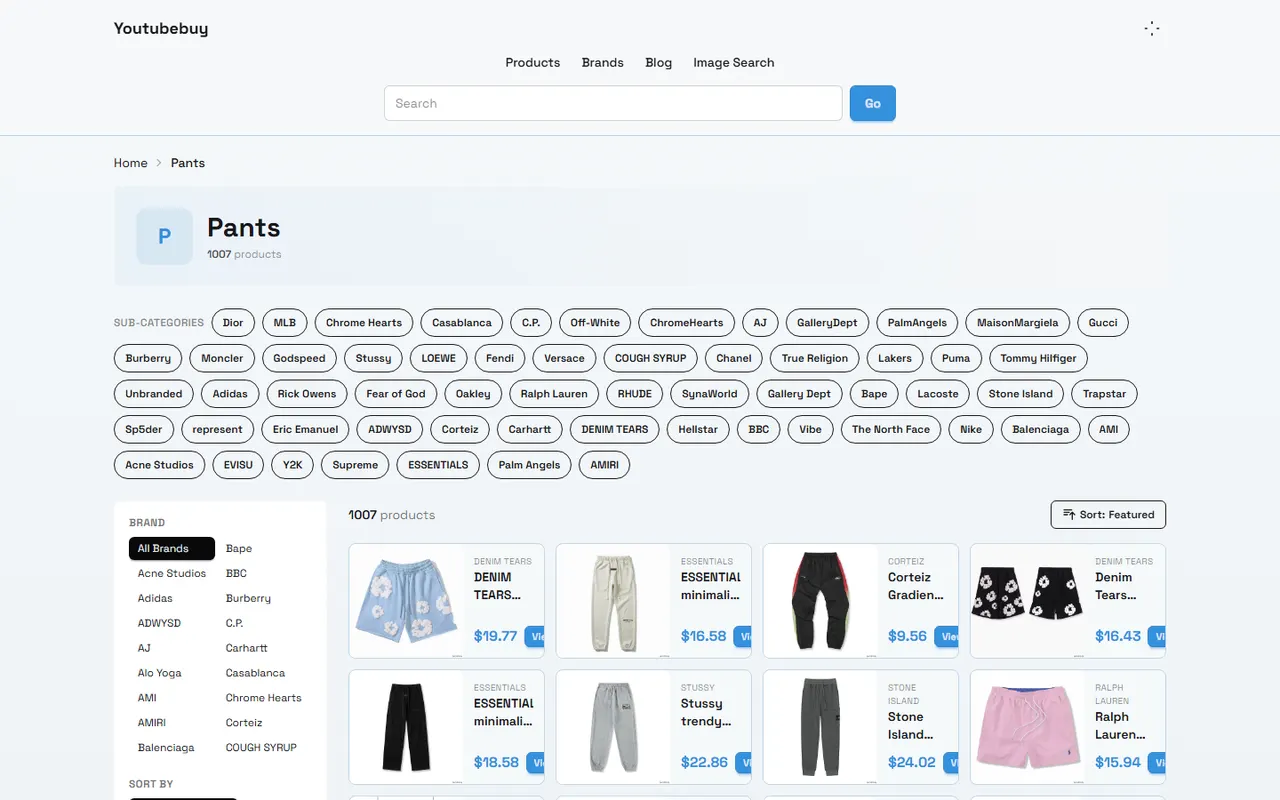
When discovering candidates, prioritize using brand filters and category filters to narrow the scope, then record visible information from product cards. Do not copy all brands into the spreadsheet at the start, as subsequent review will be slowed by duplicate titles and low-relevance candidates.
Set Up Source and Specification Fields in Google Sheets
The advantage of Google Sheets is that it turns page observations into structured records. It is recommended to create one row per candidate and set up at least the following fields:
Field | Recording Method | Purpose |
|---|---|---|
Brand Name | Record as displayed on page | Avoid rewriting brand name from memory |
Product Title | Copy the visible title in full | Identify similar products and duplicate candidates |
Category | e.g., Pants, Shorts, or Sweatpants | Compare similar items |
Page Price | Record the displayed currency and verification date | Avoid treating an old price as the current price |
Product Page Status | Accessible, redirected, blank, or pending | Determine if worth further checking |
Image Status | Corresponds to product card, blurry, or missing | Check if visual evidence is sufficient |
Source Location | Catalog category, filter conditions, or page record | Preserve discovery path |
Fact vs. Judgment | Fill separately | Prevent subjective evaluation from masquerading as page fact |
Next Step | Keep, pending verification, or exclude | Drive actual review action |
Do not write only numbers in the price field. For example, "24.02" lacks currency and date, and can easily be misinterpreted later as the current fixed price. A safer approach is to write "USD 24.02, as recorded in this page observation," and fill in the verification date separately.
If an item does not have enough information for comparison, you can keep it, but set its status to "pending verification" rather than leaving blank fields that imply it has passed screening. 🔎
Compare Brand Pages, Product Cards, and Spreadsheet Filtering
The website catalog is good for quickly discovering candidates, while Google Sheets is good for cross-page comparison. When using both in parallel, you can follow this order:
Select a clear category in the youtubebuy catalog, such as pants.
Use brand filters to narrow candidates and avoid mixing different categories.
Enter brand, title, price, and image status from product cards into the spreadsheet.
Deduplicate titles for multiple candidates from the same brand, keeping style differences.
Use spreadsheet filters to view the same brand, same category, or similar price range.
Return to the product page to verify still-missing information, and update status and date.
You can add simple filter views to the spreadsheet, such as:
Only candidates with "product page accessible";
Only candidates with price recorded but size pending verification;
Only different categories under the same brand;
Only records where image and title may not match;
Only records where the next step judgment has not been completed.
The key here is not to make the spreadsheet complex, but to quickly know "what to check" each time you return to the website. If a field does not change the decision to keep, pending verification, or exclude, there is no need to add it just for completeness.
Record Images, Links, Update Status, and Missing Information
Images can help identify whether the product card corresponds to the brand candidate, but images only show visible appearance and cannot prove material, workmanship, size accuracy, or authenticity. In the spreadsheet, image status can be written as:
Displayed, and roughly corresponds to product title;
Displayed, but image information insufficient;
Image blurry or cannot be judged;
Image may not match title;
No usable image found.
The link field should preserve page correspondence, rather than using the catalog homepage as a uniform source for all products. After saving, reopen the record to confirm the link still points to the expected page, and note if the page redirects, is blank, or is inaccessible.
Update status can use a simple four-level method:
New discovery: only catalog discovery completed;
Initial screening: brand, category, and title checked;
Pending verification: still missing information that affects purchase judgment;
Ready for pre-purchase review: page information sufficient for a final manual confirmation.
"Ready for pre-purchase review" does not equal "can purchase directly." Before that, you still need to confirm size, stock, total cost, shipping route, destination country taxes, import restrictions, and after-sales conditions. 🚚
Distinguish Page Facts, Personal Judgments, and Pending Verification Clues
The most common problem in spreadsheets is writing information of different natures in the same notes column. It is recommended to divide content into three categories.
Page facts are content directly visible from the current page, such as product title, category, displayed price, filter options, and whether images exist. Personal judgments are your comparative opinions, such as "clearer title," "price better fits budget," or "image harder to identify." Pending verification clues are matters for which evidence has not yet been obtained, such as whether sizes are complete, whether there are optional colors, whether stock remains, or whether delivery to the target region is supported.
You can use unified prefixes to help distinguish:
Fact: Page shows Pants, price displayed as USD 24.02;
Judgment: Compared to other candidates in the same sheet, current price is higher;
Pending verification: Need to confirm size chart and actual purchase availability.
Do not use unverified conclusions like "authentic," "reliable," "best," or "guaranteed." For brand candidates, the spreadsheet's role is to help you find issues that need verification, not to replace fact-checking of the brand, product, or platform.
When to Keep the Website Catalog and When to Move to Spreadsheet Organization
If the goal is just browsing for inspiration, the website catalog is usually sufficient. It is good for quickly viewing categories, brand filters, and product cards, without needing to create complete records for every candidate.
When you need to compare multiple brands at once, record page changes, organize budgets, or collaborate with others, it is worth moving to Google Sheets. Especially in the following situations, a spreadsheet is more helpful:
Multiple similar titles in the same category;
Need to filter repeatedly by brand, price, or status;
Need to record which information has been checked;
Need to recheck pages after some time;
Need to keep exclusion reasons to avoid reviewing the same candidate again.
Do not copy the entire site catalog just to "look professional." The scope of spreadsheet records should serve a clear decision: which candidates continue to be verified, which are temporarily abandoned, and the reason for abandonment.
Complete Brand Candidate Review Before Purchase
Before moving from the candidate list to purchase, it is recommended to do a final item-by-item check:
The product page is still accessible, and the page content matches the spreadsheet record.
Brand name, product title, and category are not confused.
Price includes currency and verification date, and is not mistaken for a fixed total price.
Size, color, stock, and variant information have been confirmed separately, and missing items are clearly marked.
Images are used only for identification aid, not as proof of material, quality, or authenticity.
Costs beyond the item price have been estimated, including possible service fees, international shipping, taxes, and destination country import costs.
Applicable return and exchange conditions and the path for handling dissatisfaction are understood.
Sensitive information such as passport, payment card, full shipping label, or order number has not been exposed in the shared spreadsheet.
If you are not satisfied with the received product, you should first save the order, product condition, and communication records, then submit a request according to the platform's published after-sales or return/exchange process. Do not infer from the "candidate passed" status in the spreadsheet alone that refunds, returns, or compensation will necessarily be approved. Specific outcomes depend on the policies applicable at the time, product condition, and submitted materials.
Finally, you can compress each record into one executable conclusion, such as: "Keep, waiting for size and stock verification"; "Pending, page visible but relationship between image and title unclear"; or "Exclude, duplicate candidate and lacking information for further comparison." In this way, the youtubebuy website catalog handles discovery, Google Sheets handles organization and tracking, and the final purchase decision is still based on the latest page facts and pre-purchase review.
Agent Platform Shopping FAQ
1. What should I do on youtubebuy.net if the product I received doesn't meet my expectations?
Reach out to youtubebuy.net's customer service without delay. Most non-specialty goods from Chinese sellers are covered by a 5-day unconditional return and exchange window. If the item is already in your hands and you find a defect, you must contact youtubebuy.net's support team so they can assist you in discussing a settlement with the merchant.
Customer service email addresses for each platform are listed below:
kakobuy: [email protected]
oopbuy: [email protected]
usfans: [email protected]
hipobuy: [email protected]
superbuy: [email protected]
Browse our latest products and find your next favorite item.