Check youtubebuy Coupons: Spreadsheet vs Google Sheets
Check youtubebuy Coupons: Spreadsheet vs Google Sheets
Check youtubebuy Coupons: Spreadsheet vs Google Sheets
Coupons are most likely to cause misjudgment not because you "didn't see a discount text," but because it's unclear whether that info still applies to your product, order amount, destination, and payment time. This article's goal is to help you complete a reviewable coupon check before payment: record what the page currently shows, note the update time, and list separately what still needs confirmation. 📋
This article is for buyers who have already found the product and are preparing to compare discount terms. It's not suitable for treating unconfirmed page discounts as final prices, nor for using historical records to replace real-time verification on the payment page.
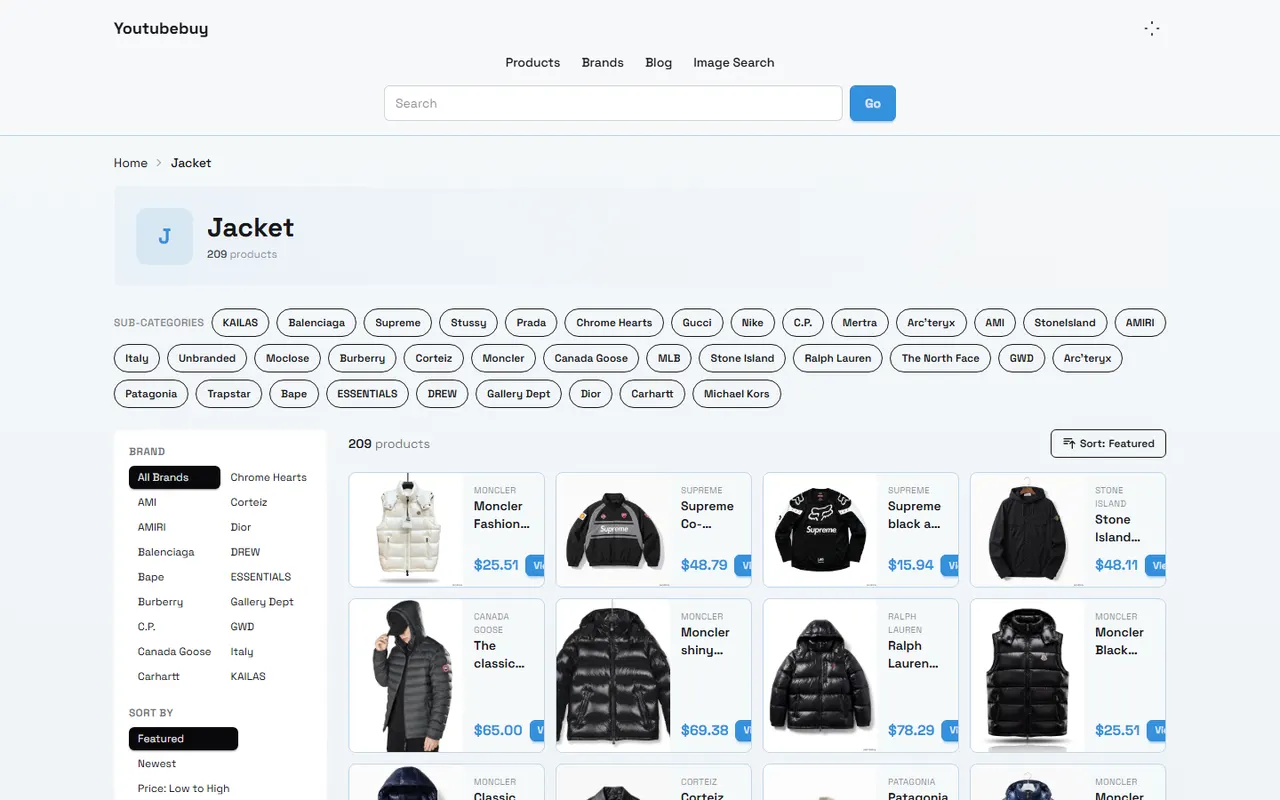
Figure: Example of youtubebuy product catalog page. The page shows product name, product category, price filter, and sorting options; this image does not constitute proof of any coupon's validity.
Verification date: October 7, 2026. This article only uses the platform information visible at the time of verification as an observation sample, and does not treat prices, inventory, coupons, or product link status as permanent facts.
First Define the Time Range and Purchase Task for Coupon Verification
First, clearly define the purchase task you need to complete, rather than first looking for the biggest-looking discount. At least record the following information:
Product name and product page URL you plan to buy
Current page price and displayed currency
Whether buying single or multiple items
Whether planning combined shipping
Destination country or region
Expected payment date
What you want to verify: product discount, order discount, shipping discount, or other promotion conditions
This step is important because "spend X get Y," "category-specific discount," and "new user discount" usually do not apply to the same batch of products. Even if a low price appears on the product page, you cannot directly infer that the price comes from a coupon; it may just be the currently listed product price.
In this verification sample, youtubebuy's product catalog page shows the Jacket category, product names, prices, brand filter, and sorting options. The bottom of the page also introduces order management and a customizable shopping spreadsheet template, but the provided page evidence does not show a directly confirmable coupon rules table. Therefore, coupon code, threshold, expiration time, and final discount amount should still be reconfirmed on the actual shopping or checkout page. 🔎
Viewing Discount Info in youtubebuy's Website-Based Spreadsheet
The youtubebuy page describes its spreadsheet template as a tool for organizing shopping budgets, calculating total costs, and managing orders. For coupon verification, the value of this website-based spreadsheet is to centralize products, prices, order status, and notes in the same workspace, rather than automatically proving that a coupon is still valid.
It's recommended to first create a coupon record, then associate it with a specific order. Each record should at least include:
Coupon name or code
Applicable products or categories
Usage threshold
Discount type and cap
Available currency
Applicable region or shipping conditions
Start time and end time
Page display time
Evidence location, such as campaign page, product page, or checkout page
Current status: pending confirmation, can try, confirmed, or expired
Do not directly write "page appeared" as "available." A safer way is to write "page displayed related information on 2026-10-07, checkout result pending." If the page does not clearly show coupon information, record it as "no coupon evidence found on the current sample page" instead of filling in "no coupon."
The website-based spreadsheet is more suitable for recording purchase context closely related to the platform page, such as product links, product prices, order notes, and in-platform status. Its advantage is reducing omissions when copying page information, but only if you leave a timestamp and evidence for each update.
Setting Up Coupon Status and Update Time Columns in Google Sheets
Google Sheets is more suitable for continuous records across orders and dates. You can create a row for each coupon and use fixed fields to keep different records comparable.
Recommended fields:
Field | Recording method | Verification focus |
|---|---|---|
coupon_status | Pending, Can try, Confirmed, Expired | Do not write "seen" as "confirmed" |
checked_at | YYYY-MM-DD HH:mm, with timezone | Record the most recent check time |
source_context | Product page, campaign page, checkout page | Explain where the info comes from |
thresholdandscope | Threshold, product scope, region restrictions | Keep complete conditions, not just discount numbers |
checkout_result | Not tested, successfully applied, not applied, error | Only update based on actual checkout feedback |
If multiple people maintain the spreadsheet together, also add "recorder" and "next review time." For coupons expiring soon, you can set a shorter review interval; for page prompts without an expiration time, don't assume they are permanently valid.
Date columns in Google Sheets can also help you filter records "not reviewed for a certain period." For example, before payment, first filter coupons with an earlier last check date, source only from catalog page, and empty checkout result, and mark these records as needing reconfirmation. 🕒
Do not use spreadsheet formulas to generate unverified "final savings amount." Formulas can calculate theoretical discounts, but the final amount may be affected by product scope, order threshold, shipping, taxes, payment fees, and exchange rates. Theoretical savings and actual payment difference should be stored separately.
Comparing Website Page Prompts, Spreadsheet Records, and Product Link Status
A complete verification should compare at least three places: platform page, record spreadsheet, and product link.
First step: open the product link, confirm the page is still accessible, and check product name, current price, and visible product information. The provided youtubebuy Jacket page shows category name, product list, brand filter, and price sorting; this information can help you locate the product, but cannot replace coupon terms.
Second step: view the page where the coupon or campaign prompt appears. If the page only shows the discount name without threshold, expiration time, or applicable scope, record the missing fields as "not stated," and do not fill them in yourself.
Third step: write the current result into the website-based spreadsheet or Google Sheets, and keep the check time. If the product page, coupon prompt, and checkout page show different results, use the page that can actually be confirmed before payment as the standard, and keep the discrepancy record for future judgment on whether it's page update delay, product scope mismatch, or coupon already expired.
You can use the following simple status logic:
Page accessible, but no coupon terms: pending confirmation
Page has terms, product and threshold match, but not yet checkout: can try
Checkout page actually shows discount: confirmed
Code error, not applied, or expired: expired or needs manual review
"Product link accessible" and "coupon usable" are two different conclusions and must be recorded separately. ✅
Recording Currency, Threshold, Applicable Scope, and Expiry Evidence
Coupon records should answer at least four questions: what is saved, on which products, under what conditions, and when it no longer applies.
Currency must match the page display. If the product price is shown in US dollars, do not default the amount in the spreadsheet to RMB or another currency. If you convert in Google Sheets, add conversion date and exchange rate source fields, and mark the converted result as an estimate.
Threshold should also keep the original conditions. For example, "spend X get Y" and "discount on designated products" cannot be merged into the same category. Also distinguish product amount threshold from order total threshold, because whether shipping, taxes, or other fees count toward the threshold can directly change whether the discount is valid.
Applicable scope should be specific to product, category, brand, region, or user eligibility. The provided youtubebuy product catalog can filter products by Jacket category and brand, but this does not mean a coupon applies to the entire Jacket category, or that all brands participate in the same campaign.
Expiry evidence can include:
Page clearly shows ended or expired
Checkout page rejects code and gives reason
Product not within discount scope
Threshold not met
Region or account conditions not met
Page link inaccessible, and no other current source can confirm
It's best to save the expiry reason, not just change status to "no." This avoids retesting the same condition next time, and distinguishes "truly expired" from "temporarily not enough evidence."
Distinguishing Currently Visible Page Info from Judgments Requiring Reconfirmation
When recording coupons, the most important boundary is separating observation and judgment.
Currently visible page info includes product name, page displayed price, filter categories, sorting method, and clear text on the page. They can be recorded directly as "page observation as of verification date."
Judgments requiring reconfirmation include whether the coupon can be used on your account, whether it covers the target product, whether it can stack with other discounts, whether it affects shipping, and how much it actually reduces after checkout. These cannot be determined solely from the catalog page or historical spreadsheet.
It's recommended to set up separate "page observation" and "verification conclusion" columns in the spreadsheet. For example:
Page observation: 2026-10-07, product page shows current price, no clear coupon code visible
Verification conclusion: coupon status pending confirmation, need to check campaign or checkout page before payment
This way of writing looks less direct than "how much saved," but it better avoids treating old information as a current promise. For time-sensitive coupons, honestly recording uncertainty is itself useful information.
Scenarios Where Website-Based Spreadsheet and Google Sheets Are Each Suitable
The two tools can be used together, not as substitutes.
Website-based spreadsheet is more suitable for purchase context within a single platform: product links, order notes, product prices, order status, and records related to platform pages. It is close to the shopping task and suitable for immediate update when opening product pages.
Google Sheets is more suitable for long-term review and cross-order comparison: coupon status on different dates, theoretical savings across multiple orders, actual checkout results, review responsible person, and records still pending confirmation. It is also more suitable for creating filtered views to centralize records with "last check time too long ago" or "checkout result empty."
If you only use the website-based spreadsheet, it may be inconvenient to statistics across dates; if you only use Google Sheets, you may lose product page and order context. A more stable approach is to let one tool store purchase context and the other store time series and review status, and clearly define which field is the final basis for judgment.
Do not automatically scrape and overwrite old records just for automation. Coupon pages may change wording, change thresholds, or disappear. Keeping old values, update times, and change reasons is usually more helpful for spotting problems than just keeping a single "current coupon" field.
Pre-Payment Coupon Timeliness Review Checklist
Before payment, use the following checklist for final confirmation:
Product link still accessible, product name matches target product
Current price and currency recorded
Coupon code or campaign name recorded, and no missing characters filled in from memory
Usage threshold, product scope, region restrictions, and expiration time all filled in, unknown items clearly marked as pending
Last verification time not older than the time range needed for this purchase decision
Checkout page shows actual discount, or you clearly know the discount is not yet confirmed
Theoretical savings amount and actual payment difference recorded separately
Shipping, taxes, payment fees, and exchange rate effects not mistakenly written as coupon savings
Old coupon records not overwritten, expiry or change reasons saved
Did not buy unnecessary products because of coupon
Finally, write the coupon status as a reviewable conclusion, not a vague "there's a discount." For example, "As of 2026-10-07, the page showed relevant purchase tool description, but the target product's coupon discount has not been confirmed on the checkout page" is more accurate than "youtubebuy has coupons."
Judgment on savings results should also be restrained: if the coupon actually reduced the order amount, the savings amount is the discount shown on the checkout page; if you added unnecessary products to meet the threshold, the extra expense may exceed the discount; if the coupon led you to choose an unsuitable shipping or combined package option, you also need to include new shipping fees, taxes, delays, and after-sales risks in the comparison. This recording method is suitable for buyers who need to continuously track coupon changes across multiple products, orders, or dates; it is not recommended to solely chase small discounts and incur extra costs, buy unnecessary products, or treat unconfirmed page prompts as definite discounts.
Agent Platform Shopping FAQ
1. What steps should I take on youtubebuy.net to evaluate whether a product's quality meets my standards?
Before finalizing a purchase on youtubebuy.net, you should examine the QC photos instead of depending on images supplied by the manufacturer, since those are usually edited. These inspection photos let you verify that the item matches your specific detail requirements. Also, be cautious about choosing products with unusually low prices on youtubebuy.net, because such items generally lack good quality.
2. What categories of products are accessible through the spreadsheet on youtubebuy.net?
The spreadsheet hosted on youtubebuy.net contains listings for shoes, clothing, bags, accessories, jerseys, perfumes, hats, scarves, belts, and a range of household daily essentials.
3. Which platform offers the most valuable coupon according to youtubebuy.net?
Based on information from youtubebuy.net, Kakobuy is suggested because it presently provides a $15 discount code with no minimum spending threshold. This is especially beneficial for youtubebuy.net users who ship smaller parcels. The promotional code to use is kakobuy888.
4. Why is it necessary to use a spreadsheet when shopping through youtubebuy.net?
On agent platforms like youtubebuy.net, products are not usually shown directly, so you need a spreadsheet to look up items you want and obtain their purchasing links. Another option is to ask for help on Reddit or Discord; the products suggested there are often high quality, but the buying procedure can be time-consuming. Spreadsheets used on youtubebuy.net are generally created over an extended period by collecting data from those communities.
Browse our latest products and find your next favorite item.